Last updated: 6th March 2026.
What Makes a Good Theatre Website Design?
Designing a theatre website is different from designing almost any other type of website. Live programming, ticketing systems and evolving audiences create a unique set of challenges.
“That’s the magic of art and the magic of theatre: it has the power to transform an audience, an individual, or en masse, to transform them and give them an epiphanal experience that changes their life, opens their hearts and their minds and the way they think.” Brian Stokes Mitchell.
So why would you settle for less with your theatre’s website?
How a website makes your audience feel should be an extension of what to expect from a performance; it should connect with them. So a strong and compelling design is a must.
But first, you’ll need to consider the content and features that best serve your audience’s needs.
Key Principles of Theatre Website Design
A strong theatre website should:
-
Make the programme easy to browse through, with a clear ‘What’s On’ structure
-
Provide seamless ticketing journeys from the production page to seat selection
-
Be accessible and mobile-first for modern audiences
-
Showcase productions visually while keeping navigation simple
-
Support ongoing content updates for evolving programmes
Still here? Great!
Effective web design for theatres needs to balance artistic storytelling with practical audience journeys.
So we wrote this article to inspire your thinking – so grab a cuppa and enjoy the show!
What Should a Theatre Website Include?
A well-designed theatre website should make it easy for audiences to discover productions, browse the programme and book tickets with confidence.
It should also support accessibility, mobile browsing and ongoing updates as seasons and productions evolve.
The sections below outline the key elements most theatre websites need.
1. Theatre Website Homepage
The homepage is an important aspect of any website, and most Theatre websites will use the opportunity to display show information immediately, but it’s also worth considering the following:
Welcome Message/Introduction: Briefly introduce the theatre, its mission and its proposition.
Featured Content: Highlight current or upcoming shows, special events, and important announcements. Consider showcasing a range of events to appeal to different audience groups. Make it easy for your audience to access this information.
Navigation Bar: Provide easy access to all main sections of the website. There is a tendency for design to take priority over accessibility with navigation, so keep referring back to your audience and make sure you don’t compromise functionality for style.
2. Production Pages and Show Information
Show information often will have its own page, with content feeds populating the homepage for upcoming or ‘spotlight’ content to promote particular shows. Things to include are:
Current Productions: Details about currently running shows including showtimes, synopsis, cast, and crew with clear links to book tickets. Reviews, trailers, backstage content and leading names are big selling points and should also be highlighted on the page.
Upcoming Shows: Information on future productions.
Past Productions: Archive of previous shows with photos, reviews, and details.
3. Online Ticketing
One of the most important website features for a theatre is online ticketing.
It provides a convenient and accessible way to book tickets anytime, anywhere. It streamlines the purchasing process, reducing queues and wait times at the box office. Plus, it provides valuable data on customer preferences and sales trends, aiding marketing and planning. Secure and user-friendly, online ticketing enhances the overall customer experience, boosts sales, and helps theatres manage capacity and resources more effectively. Think about the following:
Booking System: An easy-to-use online ticket purchasing system – which CRM are you using? Spektrix, Ticketsolve and Tessitura are some of the more popular. Do they integrate correctly with your website and provide a seamless user experience?
Ticketing is often the most fragile moment in a theatre website journey.
Audiences move from browsing productions to committing to a purchase, and even small breaks in visual continuity or navigation can create hesitation.
In our work with Lyric Stage Boston, we redesigned the journey so audiences move directly from the theatre website into PatronManager seat selection, removing redundant steps and preserving confidence at the point of booking.
Explore the Lyric Stage Boston theatre website case study
Many theatre websites struggle with this moment between programme discovery and ticket purchase, where even small breaks in continuity can reduce confidence.
Seating Chart: An interactive seating chart to allow users to choose their preferred seats can be achieved through PatronManager iFrames. See an example from the Lyric Stage Boston theatre below of how this looks, using a Spektrix iFrame.
Pricing Information: Include clear ticket price information, including discounts or special offers. Consider the use of an accessibility access key within the seat selection theatre.
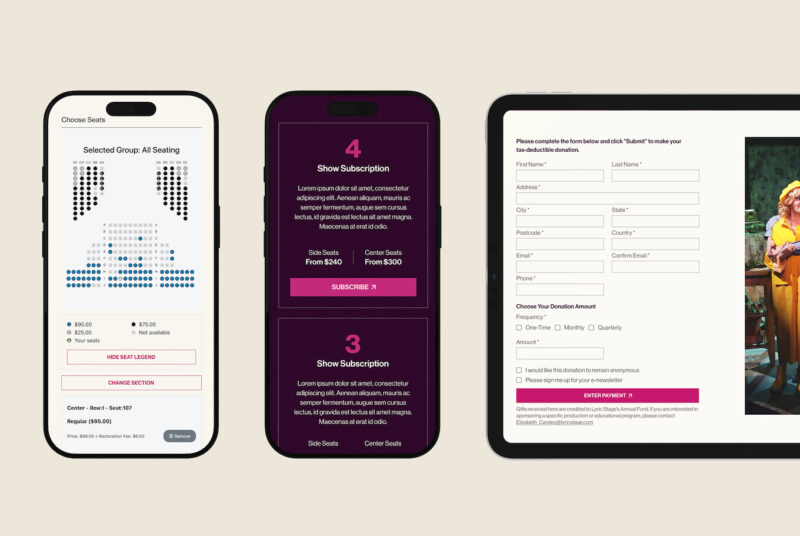
Seat selection within the Lyric Stage Boston booking journey, allowing audiences to choose their seats before completing ticket purchase.
4. The ‘What’s On’ Page and Events Calendar
For most theatres, the ‘What’s On’ page is the real heart of the website. It’s where audiences browse the programme, compare productions and decide whether to book.
We recently explored this in more detail in our guide to how theatres should structure their ‘What’s On’ pages, including programme browsing, audience segmentation and ticketing journeys.
An events calendar centralises event information, making it easy for visitors to find details about upcoming shows. A clear and updated calendar helps people plan visits and stay informed, boosting attendance by keeping the audience engaged and theatre staff organised. The calendar aids in coordination and resource management. You should consider:
Event Listings: Comprehensive calendar showing all upcoming events, shows, and special performances. To see an example of this in action, check out our Lyric Stage Boston or see the example below.
Filtering Options: Ability to filter events by date, type, category or season and highlight specific events based on holidays i.e. Christmas, kids’ holidays, etc.
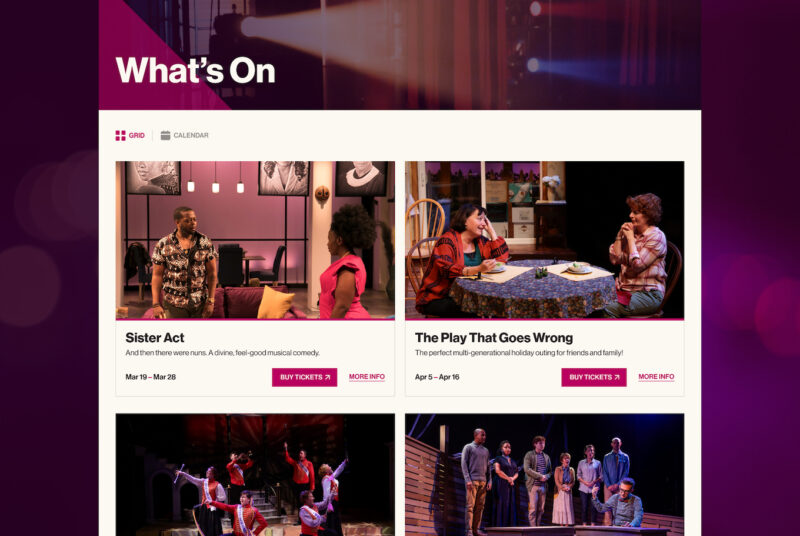
Example of the Lyric Stage Boston ‘What’s On’ page, designed to help audiences browse productions, compare performances and move easily towards booking tickets.
Considering a theatre website redesign?
Complex ‘What’s On’ pages, fragmented ticketing journeys and content structures that no longer reflect how audiences browse productions.
If you’re exploring a redesign, it can be helpful to see how other theatres have approached the challenge.
Explore our Lyric Stage Boston theatre website redesign to see how we improved the journey between programme discovery and PatronManager seat selection.
5. Membership and Donations
A well-designed donation portal is a crucial feature of a theatre website. Donations are vital to the theatre’s productions, outreach programs, and day-to-day operations. Here, you should also explore opportunities to upsell memberships during the checkout process.
Membership Information: Details on membership benefits and how to join.
Donation Portal: An easy and secure way to donate to the theatre.
Sponsorship Opportunities: Information on how businesses and individuals can sponsor the theatre or specific productions.
6. About Us
Some people will want to know more about the history of the theatre, its culture and its vision – the About Us page is a great place to house this information. Consider including:
History of the Theatre: Background information and historical context.
Mission Statement: The theatre’s goals, values, and mission.
Staff and Board Members: Bios and photos of key personnel.
7. News, Press, Blogs, Articles
Aside from keeping people abreast of the latest news, this can help position the theatre as a thought leader or champion for challenges facing the sector; it’s also an important means to execute a content strategy to support SEO efforts. A blog can be used for:
News Updates: Latest news and announcements.
Press Releases: Official press releases and media contact information.
A Media Gallery: Photos, videos, and media coverage of the theatre and its productions.
Behind-the-Scenes Content: Articles about the production process, interviews with cast and crew, etc.
Theatre News: Industry news, trends, insights, and work in the community.
8. Contact Information
Basic but important stuff that needs to be covered.
Contact Form: Easy-to-use form for general inquiries.
Contact Details: Phone numbers, email addresses, and physical address.
Social Media Links: Links to the theatre’s social media profiles.
9. Accessibility
It’s important to incorporate accessibility throughout the UX, design, and development phases to ensure a comprehensive and user-friendly experience for all users. You’ll want to consider:
Website Accessibility: The World Wide Web Consortium (W3C) recommends following the Web Content Accessibility Guidelines (WCAG) 2.1, Level AA. Plugins like AccessiBe provide an affordable option (see below), or accessibility consultants will provide a more comprehensive review and strategy for creating an accessible website.
Accessibility Information: Details on accessibility features of the theatre and website should be easy to find.
Language Options: Multi-language support if applicable.
Accessibility should also be considered in content structure, for example, ensuring event categories are communicated through text as well as colour so that all users can understand the programme.
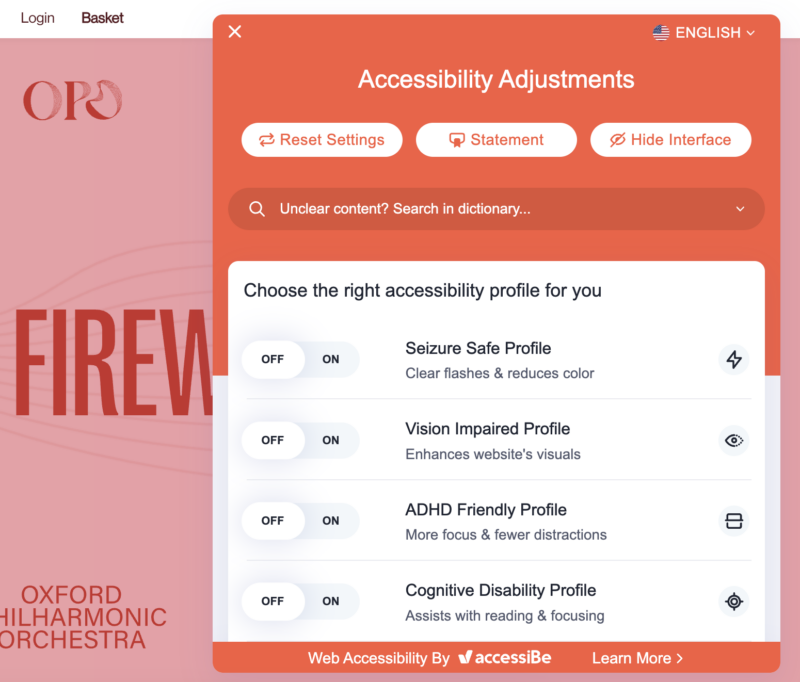
Accessibility tools can help orchestra websites meet WCAG standards and support inclusive browsing.
10. FAQs
People don’t want to have to make phone calls these days… plus from a resourcing point of view, theatre teams are small and therefore the box-office time is best spent on the phone selling tickets rather than answering FAQ-related calls.
Common Questions: Answers to frequently asked questions about tickets, shows, accessibility, and more.
11. Site Search and Production Archives
Whilst a considered user experience can negate the need for a search feature, it can be useful, especially for searching archives or for information on a specific show. Consider a site search.
Site Search: Easy-to-use search bar to help users find information quickly.
12. Mobile-Friendly Design
This is more of a general point, but with over 60% of website traffic coming from mobile devices, your website must be responsive.
Responsive Layout: Ensure the website is optimised for viewing on mobile devices.
13. SEO for Theatre Websites
An important factor often overlooked in website briefs we receive is SEO.
Search Engine Optimisation (SEO): Ensure the website is optimised for search engines to increase visibility.
Analytics Integration: Track website traffic and user behaviour for insights and improvements.
14. Privacy Policy and Terms of Service
Often referred to as the boring but essential bits…
Legal Information: Clearly state the privacy policy and terms of service to ensure transparency and trust.
15. Real World Example
When Lyric Stage Boston partnered with Chaptr to redesign its theatre website, one of the key challenges was the disjointed journey between the theatre site and PatronManager ticketing. By redesigning the pathway from programme discovery to seat selection, the experience became faster, clearer, and more confident for audiences.
Read the Lyric Stage Boston website redesign case study.
16. Common Problems We See in Theatre Website Redesigns
Through our work with theatre organisations, a few patterns appear regularly when reviewing existing websites:
-
‘What’s On’ pages that make productions difficult to browse
-
Ticketing journeys that break continuity between the website and the booking system
-
Programme structures that don’t reflect how audiences actually explore productions
-
CMS setups that make managing evolving seasons unnecessarily complicated
Addressing these structural issues early in the discovery phase often makes the biggest difference to how confidently audiences can explore the programme and move into booking tickets.
Curtains Down
A well-designed theatre website doesn’t exist in isolation.
Once the structure is in place, the next step is ensuring your programme is promoted clearly and consistently across every touchpoint.
We’ve explored this in more detail in our guide to how to promote theatre programmes effectively.
Let’s Talk
Not every organisation needs a full website redesign. Sometimes the answer is a strategic workshop, a focused improvement to the audience journey, or support refining an existing platform. Where a larger transformation is required, scope and investment are shaped around the organisation’s ambitions, complexity, and priorities.
Talk to us about your theatre website.
Join Our Community
We’re building a community within arts and culture, connecting the inspiring minds from the sector to ponder the digital opportunities and challenges upon us and share stories of digital transformation. Join our newsletter to get involved.
Photo by Kevin Schmid on Unsplash