For most theatres, the ‘What’s On’ page or programme page is the real heart of the website.
It’s where audiences browse the programme, compare productions and decide what to see next. Long before someone clicks “Book Tickets”, they are usually exploring the programme: scanning titles, checking dates, and discovering performances they might not have considered.
In many ways, the ‘What’s On’ page is the commercial engine of a theatre website. Theatres exist to bring performances to audiences, and to do that, they need people in seats. Whether the organisation is commercial, charitable or publicly funded, ticket sales remain essential to sustaining the programme and ensuring the work on stage can continue.
A well-designed programme page helps audiences quickly understand what’s happening, discover productions that interest them, and move confidently into the booking journey.
Yet many theatre websites treat the programme as a simple event listing rather than a carefully structured browsing experience.
Key Elements of a Successful Theatre ‘What’s On’ Page
A well-structured theatre programme page should:
- Make productions easy to browse and compare
- Clearly signal which performances are relevant to different audiences
- Allow visitors to filter events by genre, date or category (for complex programmes)
- Move seamlessly from programme discovery to ticket booking
- Support theatres in managing constantly evolving seasons
When these elements work together, audiences can explore the programme naturally and confidently decide what to see.
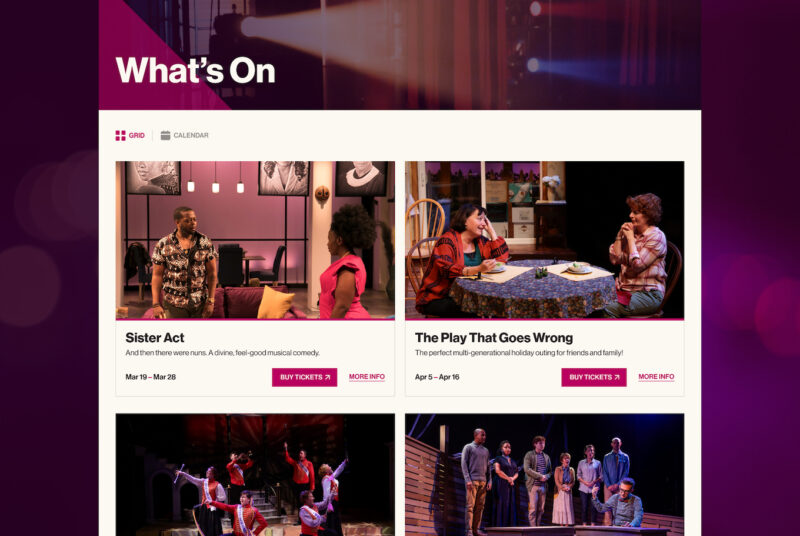
Clear Production Listings
Each production should appear as a clear and recognisable listing within the programme.
A typical listing might include:
- Production title
- Key image or artwork
- Short description or strapline
- Performance dates
- A clear Book Tickets or Find Out More link
This allows audiences to quickly understand what a production is and decide whether they want to explore further.
Productions should also be visually scannable. Visitors browsing the programme often make quick decisions based on imagery, titles and dates before clicking through to the full production page.
Intelligent Filtering
Most theatre programmes contain a wide mix of productions and events.
Filtering options help audiences navigate this more easily, allowing them to browse by:
- Genre (Drama, Comedy, Musical)
- Audience type (Family, Youth, Adult)
- Date or month
- Season or festival
These filters make the programme significantly easier to explore, particularly when theatres present large and diverse seasons.
Without filtering, audiences may struggle to locate relevant performances and abandon browsing before discovering something that interests them.
Signalling Different Audience Types
A theatre programme often serves several audiences simultaneously.
Some productions may appeal to traditional theatre-goers, others to couples planning a night out, and others to families looking for something to enjoy together.
The ‘What’s On’ page should help these audiences quickly recognise which productions are relevant to them.
This is where thoughtful tagging and content structure become important. Productions might be organised or filtered by audience type, genre or season, helping visitors quickly identify whether a performance suits them.
Clear signals such as Family, Comedy, Drama, or New Writing reduce the effort required to browse the programme and help audiences quickly find something they are excited to see.
User segmentation is often overlooked during website planning, yet it plays a crucial role in helping audiences discover productions that feel relevant to them.
Clear Visual Hierarchy
Not every production needs to carry the same visual weight.
A well-structured ‘What’s On’ page should help audiences distinguish between:
- Featured productions
- Current shows
- Upcoming performances
- Special events or one-off performances
This visual hierarchy guides attention and allows theatres to highlight priority productions without overwhelming the page.
When everything appears equally prominent, audiences can struggle to interpret the programme and may overlook key shows.
Accessible Event Categories
Accessibility should also be considered when structuring the programme.
Event categories should be communicated through text labels or icons rather than colour alone, ensuring that all users can understand how the programme is organised.
Small structural decisions like this can significantly improve the browsing experience and make the programme easier to navigate for all audiences.
Browsing the Programme Across Devices
Audiences explore theatre programmes across a wide range of devices.
The ‘What’s On’ page should therefore be easy to browse, whether visitors are viewing the programme on a desktop computer, tablet or phone.
Productions should remain easy to scan, filters should stay accessible, and ticket links should always be visible regardless of screen size.
Programme Lifespan and Seasonal Rhythm
Unlike many other websites, theatre programmes are constantly evolving.
Productions move through different phases: upcoming announcements, on-sale performances, current productions and eventually past shows. Over the course of a season, the ‘What’s On’ page must accommodate this constant movement.
A well-structured programme helps audiences understand this rhythm.
Visitors should be able to see what’s happening now, what’s coming soon and what they may want to plan for later in the season. This clarity encourages audiences to engage more deeply with the programme and return regularly to the website.
Ticketing and the Booking Journey on Theatre Websites
The browsing experience should connect naturally to the ticket booking journey.
Audiences should be able to move from discovering a production to selecting seats and completing their booking without confusion or disruption.
In practice, this means ensuring the journey flows clearly from the production page through seat selection and booking confirmation.
Even small breaks in navigation or visual continuity can cause hesitation at this stage.
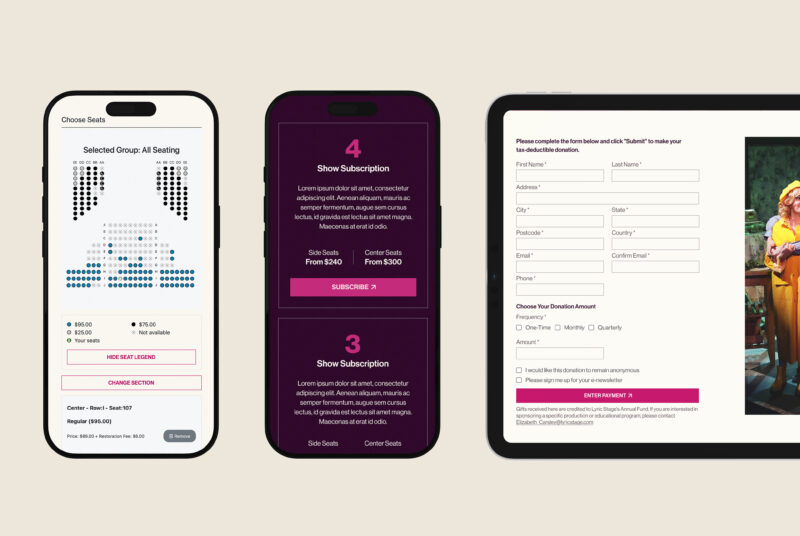
In our work with Lyric Stage Boston theatre, we redesigned the journey from programme discovery through to PatronManager seat selection to ensure audiences could move confidently from browsing productions to completing their booking.
Memberships, Subscriptions and Multi-Show Discounts
Many theatres offer membership schemes, subscription packages or multi-show discounts as part of their ticketing strategy.
These options can often be integrated into the booking journey, allowing audiences to upgrade to membership, support the organisation or commit to multiple performances during checkout.
When integrated thoughtfully with the ticketing system or CRM, these features can strengthen audience relationships while encouraging repeat attendance.
CMS Limitations and Programme Management
Another common challenge with theatre ‘What’s On’ pages comes from how the programme is structured behind the scenes.
Many websites rely on CMS configurations that were not originally designed with programme browsing in mind. Events may be treated as simple posts or calendar entries, limiting how productions can be organised, filtered and presented to audiences.
This can lead to problems such as:
- limited filtering options
- inconsistent production listings
- difficulty managing productions with multiple performances
- disconnected programme and ticketing systems
In many cases, these limitations are not caused by the CMS itself, but by a lack of UX consideration during the early planning phase of the website.
When programme structure is designed thoughtfully from the outset, theatres can manage complex seasons more easily while giving audiences a clearer and more intuitive browsing experience.
Directing Enquiries to the Right Departments
The ‘What’s On’ page often generates a large number of enquiries from audiences.
Providing clear signposting to relevant departments can help theatres manage this more effectively. For example, directing visitors to specific contact points for box office enquiries, education programmes, accessibility services or venue hire.
Clear departmental signposting ensures enquiries reach the right teams and reduces unnecessary pressure on busy theatre staff.
Designing a Programme That Supports Ticket Sales
A well-structured programme page does more than simply display events.
It helps audiences discover productions, compare dates and move naturally into the booking process.
When the browsing experience is clear and intuitive, audiences are far more likely to explore the programme and book tickets with confidence.
If your theatre is considering a website redesign, the structure of the ‘What’s On’ page is often one of the most important places to start.
For a broader look at theatre website design, including ticketing integration, accessibility and programme structure, explore our guide to designing a theatre website.
At Chaptr, we specialise in website design for theatres, orchestras and live performance organisations, helping cultural venues structure their programmes clearly and connect audiences with performances.
If you’d like to discuss your theatre’s digital programme or website, get in touch with our team.
What about promoting your Theatre Programmes?
While the structure of the ‘What’s On’ page is critical, it’s only one part of a wider promotional ecosystem.
How your programme is presented across your website, social channels, email campaigns, and physical spaces all play a role in how audiences discover and engage with your work.
We’ve explored this in more detail in our guide to how to promote theatre programmes effectively.